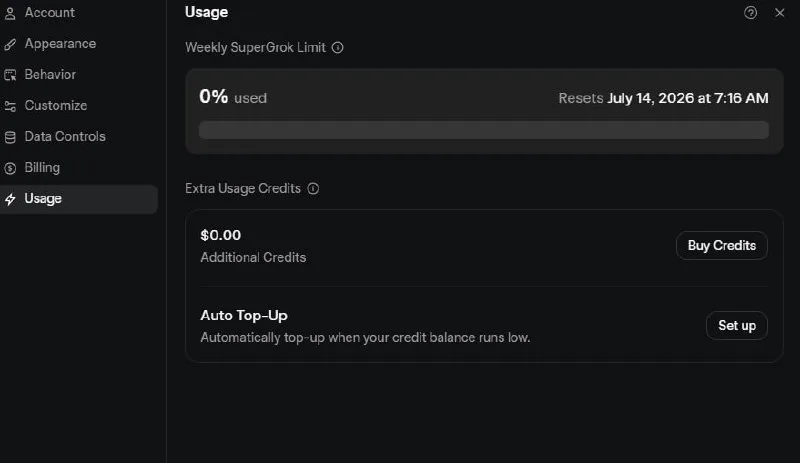
How to Check Your Grok AI 1.5 Usage
Wondering how many videos you can still make with Grok AI 1.5? The old 20-videos-a-day limit is gone.
Usage now resets every 7 days, and you can check how much you have left anytime.
Tutorial
- Sign in to your Grok account.
- Open Settings.
- Choose Usage.
- Check the percentage you have left.
Wrapping Up
Now you always know where you stand. The counter resets every 7 days, so check it whenever you need to plan your next videos.
Does this still work?
Nobody's checked yet
Sign in to tell everyone how it went.
Continue with GoogleBe the first — one tap saves the next person an hour.
It takes 3 reports in 30 days to set the status.
More shares you might like
How to Get Free $200 Funds on Digital Ocean
Hey, you know how sometimes you just need a server or something, but you're like, "Ugh, funds are low"? Well, guess what I found? I discovered a super cool way …
Will Emerging AI Replace Our Jobs?
The rise of Artificial Intelligence (AI) has sparked both excitement and concern. While AI brings powerful tools to improve productivity, it also raises a big q…
How to Get Gemini Pro for 15 Months Free
Hey friend! Ever felt stuck figuring out how to use the latest AI tools without breaking the bank? Well, I've got some cool steps that could help us get Gemini …
How I Got 600 Followers in 2 Days
Create a TikTok account. Find funny videos on Instagram. Make sure the videos have no watermark. Reupload them on your TikTok. Promote your account using "More …
Comments
Join the conversation — sign in to comment.
No comments yet — start the conversation!